
Spend less time bookkeeping.
Replace repetitive data entry with bookkeeping automation software that captures receipts, matches bank transactions and keeps your records current, so you can focus on growing your business instead of updating spreadsheets.
TL;DR: The best bookkeeping automation software doesn’t just replace spreadsheets; it changes how your business manages financial records. While MTD compliance is now expected across leading accounting platforms, the real difference lies in OCR accuracy, reliable bank feeds and automated reconciliation that reduce manual work without sacrificing financial visibility.
No business starts because someone enjoys reconciling bank statements at the end of the month.
Yet countless small business owners still spend evenings chasing receipts, matching transactions and correcting manual entry errors that software was supposed to eliminate years ago. The result isn’t merely lost time; it’s delayed financial decisions, mounting administrative work and less confidence in the numbers you’re relying on.
“The biggest improvement I see isn’t that businesses stop bookkeeping manually. It’s that they stop spending time checking whether the bookkeeping is correct. Good automation replaces repetitive work, but trustworthy bank data is what makes that automation dependable.” – Ravi Ranjan, Finexer
At Finexer, we work with UK accounting, ERP and bookkeeping platforms integrating Open Banking infrastructure into their products. Across those implementations, one pattern stands out: almost every leading bookkeeping application now supports Making Tax Digital (MTD), but the quality of bank data, and what the software can do with it, continues to separate average bookkeeping experiences from exceptional ones.
The Problem with Manual Bookkeeping in 2026
Manual bookkeeping costs far more than the hours spent entering numbers into accounting software.
Every receipt that sits in a wallet, every bank transaction that needs matching and every invoice that requires manual categorisation delays your understanding of the business. Small mistakes accumulate, reconciliation takes longer, and month-end reporting becomes a task many owners postpone because it feels overwhelming.
The problem becomes more noticeable as a business grows.
A sole trader processing twenty monthly transactions might manage with spreadsheets. A growing consultancy, retailer or agency handling several hundred transactions each month quickly discovers that manual bookkeeping consumes time that should be spent serving customers or winning new business.
The issue isn’t a lack of bookkeeping software.
It’s that many businesses only automate part of the process.
What Modern Bookkeeping Automation Software Should Actually Do
Modern bookkeeping automation software should reduce repetitive work while improving the accuracy of financial records.
When comparing products, look beyond marketing claims and evaluate how well the software automates the tasks that consume the most time.
1. OCR receipt capture
The software should extract supplier names, dates, VAT amounts and totals from photographed receipts.
Leading bookkeeping platforms typically report OCR accuracy exceeding 99% under suitable image conditions, although results vary depending on document quality and handwriting. The goal isn’t to eliminate review entirely but to minimise manual typing.
2. Automatic bank-feed reconciliation
Instead of importing CSV files every week, transactions should flow directly from your bank into your accounting records, ready for review and matching.
Reliable bank feeds reduce duplicate work and make reconciliation a routine process rather than a monthly project.
3. Intelligent transaction categorisation
Recurring suppliers, subscriptions and customer payments should become easier to categorise over time through configurable rules and historical behaviour.
Automation should reduce repetitive decisions, not remove financial oversight.
4. MTD compliance
Making Tax Digital is no longer a competitive advantage.
QuickBooks, Xero, Sage and several other accounting products already support HMRC’s digital reporting requirements. Compliance has become the minimum expectation rather than the deciding factor when choosing bookkeeping software.
5. Clear financial visibility
The best software keeps records current enough that cash flow, expenses and outstanding payments can be reviewed without waiting until month-end.
Manual Bookkeeping vs Bookkeeping Automation Software
The decision isn’t whether bookkeeping should be digital.
It’s how much of the bookkeeping process should still depend on manual effort.
| Task | Manual Bookkeeping | Bookkeeping Automation Software |
|---|---|---|
| Receipt entry | Manual typing | OCR receipt capture |
| Bank transactions | CSV downloads | Connected bank feeds |
| Transaction matching | Manual reconciliation | Suggested matches |
| Expense categorisation | Individual review | Rules and recurring categorisation |
| VAT preparation | Manual calculation | MTD-ready reporting |
| Month-end close | Time-consuming | Ongoing reconciliation |
Automation doesn’t replace professional judgement.
Instead, it reduces the amount of routine administration required before that judgement can be applied.
Why MTD Compliance Is No Longer the Differentiator
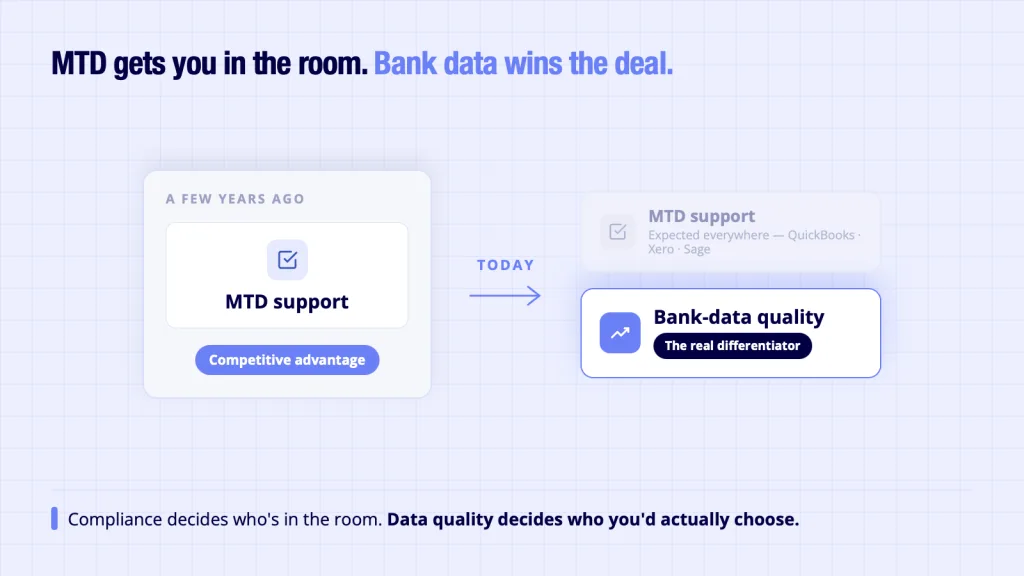
A few years ago, MTD support was a major reason to upgrade bookkeeping software.
Today, it has become an expected feature.
Most established accounting applications already provide digital record-keeping and HMRC submission capabilities. As a result, businesses comparing bookkeeping products increasingly ask different questions:
- How accurate is receipt capture?
- How quickly do transactions appear?
- How much manual reconciliation is still required?
- Can multiple business accounts be connected?
- How reliable are the bank feeds?
These questions reveal where software begins to differ.
Compliance helps businesses meet regulatory obligations.
Data quality determines how useful the bookkeeping system becomes every day.
How Bank Data Improves Bookkeeping Automation
Reliable bank data allows bookkeeping software to automate more than transaction imports.
When your business grants permission through Open Banking, Account Information Services (AIS) retrieve account and transaction information from participating banks using secure APIs. With your consent, the bookkeeping application receives structured transaction data that can be matched against invoices, expenses and accounting records.
That consistent flow of information enables several automations:
- importing transactions without manual downloads
- identifying duplicate entries
- suggesting reconciliation matches
- updating cash balances
- supporting expense categorisation
- improving financial reporting
The software still decides how to categorise and present information.
Open Banking supplies the bank data that makes those features possible.
If you’re interested in the technical side of how accounting platforms connect to banks, our guide to the bank feed API explains the underlying mechanism without requiring a deep technical background:
The Gap: Why Automation Still Needs Human Oversight
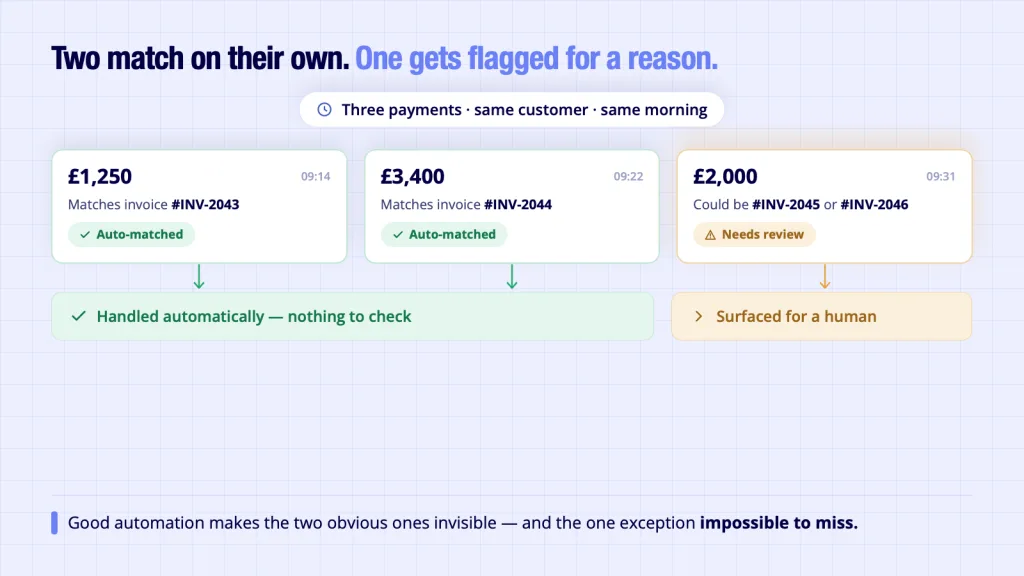
Even the most capable bookkeeping software cannot automate every financial decision.
Imagine your business receives three payments from the same customer on the same morning. Two relate to outstanding invoices. One is an advance payment for future work. The software may recognise the customer and suggest likely matches, but someone still needs to confirm how those payments should be recorded.
Automation works best when repetitive tasks become faster while exceptions remain visible.
That’s why businesses should judge bookkeeping software not by how much it claims to automate, but by how efficiently it helps users resolve the situations that automation alone cannot.
Likewise, reliable bank data matters because inaccurate or incomplete transaction information creates uncertainty before the bookkeeping workflow even begins.
Where Finexer Fits: Reliable Bank Data Makes Better Automation Possible
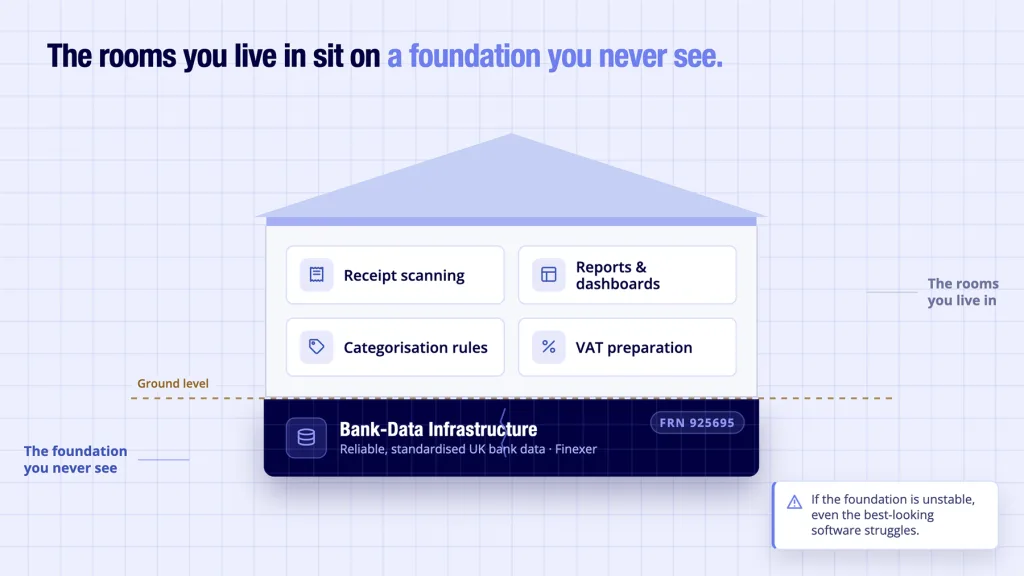
When businesses compare bookkeeping software, they usually focus on visible features: receipt scanning, dashboards, reporting and invoice management.
Those features matter.
But they all depend on something users rarely see: reliable access to bank transaction data.
Think of bookkeeping automation software as a house.
The interface, reports and automation rules are the rooms you live in.
The bank-data infrastructure is the foundation. If that foundation is unstable, even the best-looking software begins to show cracks.
This is where Finexer fits.
Finexer doesn’t build bookkeeping software or compete with accounting platforms. Instead, it provides the Open Banking infrastructure that allows accounting products to access reliable, standardised bank data from UK financial institutions.
That means software providers can spend more time improving the bookkeeping experience and less time maintaining bank connections.
What reliable bank data enables
High-quality bank connectivity supports many of the automation features business owners now expect, including:
- Continuous bank transaction imports
- Faster reconciliation workflows
- More accurate transaction categorisation
- Current cash-flow reporting
- Reduced duplicate entries
- Better financial visibility throughout the month
The bookkeeping platform remains responsible for categorisation logic, reporting, dashboards and the overall user experience.
Finexer provides the infrastructure layer that supplies dependable bank data underneath those features.
If you’d like to explore how Open Banking supports accounting platforms more broadly, our guide to Open Banking integration for accounting explains how financial software uses secure bank connectivity to improve everyday bookkeeping workflows.
For businesses interested in reconciliation specifically, our article on automated payment reconciliation explores how incoming payments can be matched more efficiently against accounting records.
Why Good Bank Data Has Become the Real Differentiator
Not long ago, bookkeeping software competed primarily on compliance.
Today, most established accounting platforms support:
- Making Tax Digital (MTD)
- Digital VAT submissions
- Cloud access
- Mobile applications
- Invoice creation
Those capabilities are increasingly expected.
The next competitive advantage lies elsewhere.
It lies in how effectively software turns financial data into useful bookkeeping.
Poor-quality bank data creates unnecessary work:
- Transactions arrive late.
- Descriptions differ between banks.
- Duplicate imports require manual review.
- Missing information makes categorisation difficult.
- Reconciliation becomes slower.
Reliable, structured transaction data produces the opposite outcome.
Bookkeepers spend less time correcting records and more time reviewing exceptions that genuinely require professional judgement.
For growing businesses, that difference becomes increasingly valuable as transaction volumes rise.
What Is Accounting Process Automation?
Accounting process automation is the use of software to reduce repetitive financial tasks without removing human oversight.
Rather than replacing accountants or bookkeepers, automation handles structured, repeatable activities such as:
- importing bank transactions
- capturing receipt information
- matching invoices to payments
- categorising recurring expenses
- generating VAT reports
- reconciling bank accounts
The objective isn’t to eliminate review.
It’s to eliminate unnecessary repetition.
Businesses often begin with receipt capture before gradually introducing bank-feed reconciliation, payment matching and automated reporting. As those processes mature, accounting teams spend less time collecting information and more time analysing it.
If you’re interested in how automation extends beyond bookkeeping into wider finance operations, our guide to accounting process automation explores the broader transformation taking place across accounting software.
Likewise, our article on the automation of accounting process explains how better bank data improves accuracy throughout financial workflows.
Choosing Bookkeeping Automation Software: A Practical Checklist
Before investing in bookkeeping software, ask these questions.
Does it support MTD?
This should be the starting point, not the deciding factor.
How accurate is receipt capture?
Look for OCR performance that reduces manual corrections while recognising that no system achieves perfect results in every situation.
How reliable are the bank feeds?
Consistent bank connectivity often saves more time than additional reporting features.
How much reconciliation is automated?
The best software reduces repetitive matching while allowing users to review exceptions easily.
Will it grow with your business?
Software should continue performing well as transaction volumes increase, additional users are added and more bank accounts are connected.
What is bookkeeping automation software?
Bookkeeping automation software reduces manual financial administration by automating tasks such as receipt capture, transaction imports, bank reconciliation and expense categorisation. Most modern platforms combine OCR technology with bank feeds to minimise repetitive data entry.
Which bookkeeping software is MTD-compliant?
Several leading UK accounting platforms, including QuickBooks, Xero and Sage, support Making Tax Digital requirements. Because MTD compliance is now widely available, businesses should also compare automation capabilities, usability and bank-feed reliability before choosing software.
How much time can bookkeeping automation save?
The answer depends on transaction volume and existing processes. Businesses handling hundreds of monthly transactions typically save considerably more time than those processing only a few invoices each month because repetitive reconciliation and data entry reduce significantly.
What’s the difference between bookkeeping software and accounting software?
Bookkeeping software focuses primarily on recording day-to-day financial transactions, while accounting software often includes broader capabilities such as budgeting, forecasting, payroll, reporting and financial analysis. Many modern cloud platforms combine both functions.
Can bookkeeping automation completely replace manual bookkeeping?
No. Automation reduces repetitive work, but professional judgement remains essential for reviewing exceptions, handling unusual transactions and ensuring financial records accurately reflect business activity.
Do I need Open Banking to use bookkeeping automation software?
Not always. Many platforms support manual imports as well as Open Banking. However, secure bank feeds generally improve automation by providing current transaction data directly from participating banks, reducing the need for CSV uploads and manual reconciliation
Your business deserves better than weekend bookkeeping.
Choose bookkeeping software built on reliable financial data and spend more time making business decisions instead of correcting financial records. Discover how Finexer’s Data API supports dependable bank connectivity for accounting platforms, or explore our Accounting & ERP use case.
To see how Open Banking infrastructure enables smarter financial software.
Explore with AI
About the Author

Ravi Ranjan
Ravi Ranjan is Co founder & CEO of Finexer